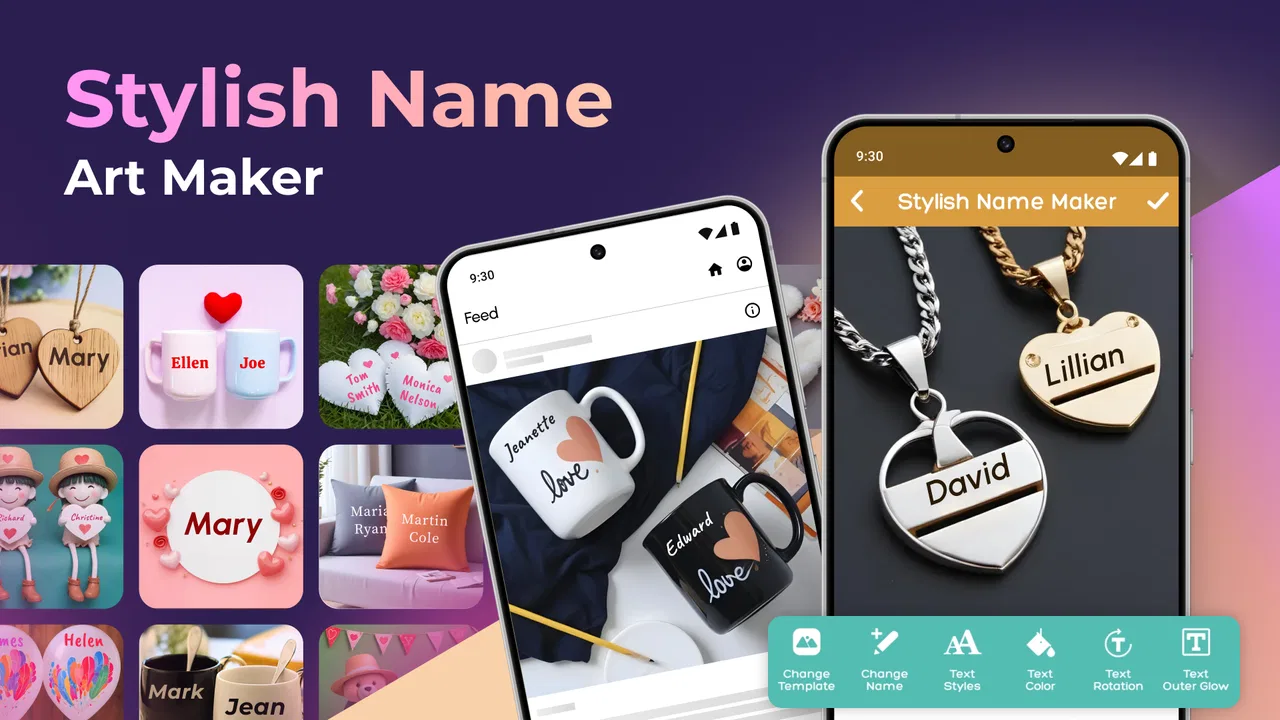
Stylish Name Art Maker
- 5.0
- Rating
- 1.00M
- Installs
- Free
- Price

 Analysis by App-foxy
I approached Stylish Name Art Maker as a quick creative tool rather than a full illustration studio. Its purpose is straightforward: turn a name or short piece of text into decorative artwork that can be used on an image. After spending time with it, I think its biggest appeal is the low barrier between having an idea and producing something shareable. You do not need drawing experience to make a personalized result, and the app fits naturally into small creative jobs such as preparing a profile image, greeting, invitation, status graphic, or gift-themed design.
That simplicity is also the key to judging it fairly. This is an Art & Design app from Prometheus Interactive LLC, not a replacement for a layered editor or a professional typography program. I found it most useful when I wanted a name to be the visual focus and did not want to build a composition from scratch. If your goal is detailed photo retouching, precise layout work, or advanced lettering control, a more comprehensive editor will still be the better choice. If you want attractive name-based decoration with less effort, this app makes a convincing case for itself.
How the experience feels in everyday use
I’ll focus on the small decisions that shape a name graphic: choosing words that fit, keeping the lettering readable, and checking how the finished image will appear once it leaves the editor. Those practical checks matter most when a design is meant for a real person or occasion, rather than simply for experimenting. Next, I’ll look at how that focused approach plays out in an everyday use case.
You May Also Like

 Blood Strike: 2.5 Anniversary
Blood Strike’s Loadouts Turn Every Drop Into a Tactical Gamble
A close look at Blood Strike’s custom loadouts: how fast access to signature weapons reshapes its battle royale rhythm, rewards preparation, and narrows the gap between fights.

 Pandora - Music & Podcasts
Pandora’s Music Is Easy to Start, but Harder to Recover
Pandora’s strength is its low-effort path from a seed to a station. Its weak spot is how much confidence it asks you to place in connection, setup, and quiet recovery.

 8 Ball Pool
 Is Built on Rivalries, Rematches, and Routine
A close look at the rivalries, rematches, shared routines, and unanswered safety questions that turn a quick pool match into a persistent mobile community.

 Samsung Music
’s Quiet Strength Is Playing What You Already Own
Its reach comes less from spectacle than from dependable access to a personal library. That simplicity is both the app’s strongest retention engine and its ceiling.

 AccuWeather: Weather Radar
AccuWeather Review: A Quick, Clear Forecast for Everyday Decisions
For everyday plans, the best forecast is the one you can understand quickly. AccuWeather makes rain timing, radar, and local conditions easy to act on, with a few trade-offs.

 Hill Climb Racing
Why Hill Climb Racing Still Turns Crashes Into One More Run
A tiny car, a bumpy hill and one more upgrade: Hill Climb Racing keeps resurfacing because its simple chaos makes every near-miss feel personal.
More From Our News Desk



Readability and navigation come first
The first thing I noticed is that the app’s central idea is easy to understand. You begin with a name or text, choose a decorative direction, and work toward a finished image. That clear purpose matters for people who may feel overwhelmed by design software full of unfamiliar tools. Instead of asking you to learn a complete editing vocabulary, the app keeps attention on the words you want to decorate.
For a casual user, that makes the learning curve gentle. I could imagine recommending it to someone who wants to create a birthday graphic for a family member but does not normally use design applications. The task is concrete, and the result is personal. A child, older relative, or first-time creator can understand the appeal without needing to know about typography, layers, or composition theory.
Still, easy to understand does not always mean equally easy to read. Decorative lettering can become visually busy, especially when the background and the text compete for attention. My practical advice is to judge each design at the size where it will actually be viewed. A name that looks impressive on a large phone screen may lose clarity when used as a small profile image. I would also keep the wording short when the design is intended for quick recognition.
The most useful habit is to check the final name at thumbnail size before sharing it. This catches a common problem with name-art tools: an attractive effect can reduce legibility. If the letters blend into the background, the design has failed its main job, even if the decoration itself looks polished.
The app is free to download and use, which makes experimenting less intimidating. There are in-app purchases ranging from $0.99 to $99.99 per item, so I would pay attention to any purchase prompt and decide whether a particular extra is genuinely useful before confirming it. For someone testing the app casually, the free starting point is enough to discover whether the style suits them.
Motor and sensory considerations
From an interaction standpoint, a name-decoration app can be friendlier than a traditional editor because it reduces the amount of precision work involved. You are not necessarily expected to draw tiny shapes, trace outlines, or make repeated adjustments with a fingertip. That can help users who find detailed touch editing tiring or difficult. The basic creative goal is also forgiving: a personalized name can still feel successful without perfect alignment.
However, decorative design is not automatically accessible design. Bright effects, ornate backgrounds, and complex lettering may be uncomfortable for people who are sensitive to visual clutter. Someone with low vision may also struggle with thin strokes, low contrast, or elaborate letterforms. I would treat every visual option as a choice that needs checking rather than assuming the most dramatic style is the most usable.
A good workflow is to create two versions: one expressive version for people who enjoy visual detail, and another with stronger contrast and simpler lettering for practical sharing. The second version may be better for a contact image, a small social avatar, or a graphic viewed outdoors. This is one area where personal taste and accessibility overlap; a cleaner design is often easier for everyone to recognize.
The same principle applies to sensory load. If a design feels crowded, I would not keep adding decoration simply because the app makes it available. A short name with a restrained background can communicate more effectively than a heavily embellished composition. Users who prefer calm visuals should spend time comparing the plainest options before moving toward stronger effects.
Situational access: where it fits best
I see the app working particularly well in short, informal situations. Imagine receiving a message that a friend has opened a small online shop. You want to send a personalized congratulations image, but you do not have time to learn a full design program. A name-focused creator lets you produce something that feels made for that person rather than sending a generic card.
It can also be useful for family occasions. A decorated name may work on a digital greeting, a simple invitation image, or a celebratory post. Because the concept is narrow, you can move from idea to result without first deciding how to construct an entire scene. That is valuable when the emotional point is personalization, not technical originality.
For social profiles, I would be more selective. The app can help create a distinctive identity, but a detailed name design may not remain readable when cropped or displayed small. Before using one as a profile image, I would test the composition in a square crop and make sure the important letters remain visible near the center. This small check can prevent an otherwise attractive design from losing its meaning.
The app may also suit users who need a quick visual label for a digital project or event. A name graphic can make a folder cover, announcement, or informal presentation feel less anonymous. I would not rely on it for formal branding, though. A business identity usually needs repeatable typography, exact color control, and consistent export standards, while this tool is better understood as a fast personal-design solution.
Its Everyone content rating makes the concept approachable for a broad audience. That does not mean every design will suit every viewer, because visual preferences vary, but the subject matter itself is simple and family-friendly. Parents or guardians looking for a low-pressure creative activity may find the name-based focus easier to explain than a large, open-ended drawing app.
Three practical techniques that improve the result
My first technique is to start with the intended viewing distance, not with the most attractive preview. If the image will be seen on a phone notification or a small avatar, prioritize letter separation. If it will be shared as a larger greeting, you can afford more decorative detail. This reverses the usual temptation to choose the most elaborate design first and discover later that the name has disappeared inside it.
Second, I would prepare the wording before opening the editor. Decide whether you need a first name, a nickname, initials, or a short greeting. Long phrases can make a name-art format feel cramped, while a carefully chosen nickname may look more balanced. This is a small planning step, but it saves time because you are evaluating designs against a clear purpose rather than changing the message repeatedly.
Third, create a practical backup version. Keep one design with strong readability even if your favorite version is more decorative. This is useful when the same artwork needs to travel between contexts: a large image can use the expressive version, while a small profile placement can use the simpler one. The trade-off is worth it because accessibility and visual clarity often depend on where the image appears, not just how it looks in the editor.
Where the app is less comfortable
The narrow focus is both its strength and its main limitation. If I wanted to remove a distracting object from a photograph, build a multi-layer poster, draw a custom illustration, or control every typographic detail, I would choose a general-purpose design editor instead. Those alternatives take longer to learn, but they provide more control when the project demands precision.
I would also be cautious about using it for text-heavy communication. A decorated name is not the same as an accessible information graphic. Important instructions, event details, emergency information, or long announcements should use clear text in a layout designed for reading. Decorative lettering can support a message, but it should not carry essential information by itself.
Another limitation is that creative choice can become friction when the available styles are visually similar or when you are looking for a very specific mood. A user who wants a minimalist monogram, exact brand typography, or a carefully matched color palette may spend more time compromising than creating. In that situation, a blank canvas with explicit controls is likely to be more satisfying.
The purchase structure is another point to consider. Since individual in-app items can range from a small amount to a much larger amount, I would avoid tapping through options automatically. The free access makes the app easy to try, but users should remain deliberate when exploring paid extras. That is especially important for families sharing a device or for anyone who prefers a completely predictable creative workflow.
Performance expectations and version context
The current version is 13.1.0, and the app supports Android 6.0 or later. That gives it a broad compatibility range for Android users who are not running the newest phones. In practical terms, compatibility is helpful for households that keep older devices as secondary phones or for people who do not upgrade frequently.
Even with compatible software, the experience can vary depending on the phone’s screen, touch response, and available space. A smaller display may make decorative comparisons harder, while a device with a less responsive touchscreen can make adjustments feel less comfortable. I would do the main design work on the clearest, most responsive device available and use the final preview to check whether the name remains readable.
The app has been available since May 11, 2018, and its audience has grown beyond a tiny niche: it has passed one million installs. Its average rating is 5.0 from around eighteen thousand ratings, with two hundred ten written reviews. Those figures suggest strong user enthusiasm, but I would still treat them as a starting point rather than a substitute for matching the app to your own needs. People who want quick personalized artwork are likely to value it more than people searching for professional editing controls.
Who should try it, and who should skip it?
I would recommend trying it if you want to personalize a name without learning a complicated editor. It is a good fit for casual creators, parents preparing simple greetings, users making profile artwork, and anyone who enjoys experimenting with decorative text. The free entry point also makes it reasonable to test before deciding whether the available styles are worth keeping in your regular toolkit.
I would be less likely to recommend it to a professional designer, a small business that needs a consistent identity system, or a user who depends on exact accessibility controls. Those users may need predictable contrast, reusable templates, precise type settings, and more direct control over every visual element. A broader design application will usually be the better investment for those jobs.
Users with motor or visual limitations should not assume the app will solve every interaction challenge, but they may still find the focused workflow easier than a full editor. I would suggest choosing simpler designs, checking contrast carefully, and allowing extra time for previewing the result. If touch adjustments become tiring or the decorative styles remain difficult to read, stopping at that point is sensible rather than forcing the app into a role it was not built to fill.
My inclusive verdict
Stylish Name Art Maker succeeds because it makes a small creative task feel approachable. I like it as a focused tool for turning a name into something more personal than plain text, and I appreciate that the idea is understandable even for people who do not identify as designers. Its strongest use is quick, informal visual personalization, especially when the goal is warmth, identity, or a little celebration.
Its inclusive value depends on how thoughtfully the creator chooses the final style. The app can reduce the technical burden of making an image, but users still need to protect readability, avoid unnecessary visual clutter, and consider where the artwork will be viewed. I would make a clear version alongside a decorative one whenever the image matters beyond casual sharing.
Overall, I see it as a friendly starting point rather than an all-purpose art suite. The free app is worth exploring for name-centered designs, while the optional purchases deserve careful attention and professional projects call for a more controlled alternative. If you want a quick personalized graphic and are willing to judge each result for clarity as well as appearance, this is a convenient little creative companion with a genuinely low entry barrier.
FAQs for Stylish Name Art Maker
01What is Stylish Name Art Maker used for?
Stylish Name Art Maker is a creative design app for turning ordinary names and short text into decorative graphics. After testing its main tools, we found options for stylish fonts, symbols, colors, backgrounds, stickers, and other visual effects. It can be useful for creating profile pictures, social media posts, greeting images, logos, gaming names, and personalized wallpapers.
02Can I use Stylish Name Art Maker without an internet connection?
Many of the basic editing features in Stylish Name Art Maker can generally be used offline once the app and its available resources have loaded. However, internet access may be required for downloading additional templates, fonts, stickers, advertisements, or sharing designs through online platforms. Offline availability can vary by device and app version, so users should check the specific tools they want before relying on the app without a connection.
03Does Stylish Name Art Maker include ready-made templates and fonts?
Yes, the app is designed around a collection of preset styles that help users create attractive name art without starting from a blank canvas. Depending on the version, you may find decorative fonts, text effects, frames, backgrounds, stickers, gradients, and themed templates. The selection is convenient for beginners, although some designs or resources may be limited, locked, or supported by advertisements.
04Can I save and share designs created with Stylish Name Art Maker?
Stylish Name Art Maker normally allows finished creations to be saved to the device gallery and shared through compatible apps such as messaging services and social networks. Before exporting, it is worth checking the available image quality and file format, particularly if you plan to use the design for printing or as a professional logo. Some free exports may include branding, advertisements, or resolution restrictions.
05Is Stylish Name Art Maker free to download and safe to use?
The app can typically be downloaded at no initial cost, but free access may include advertising, optional purchases, or premium content. As with any creative app, download it from the official Google Play Store or Apple App Store and review the requested permissions before installation. Avoid entering sensitive information, and check the privacy policy if you intend to upload personal photos or create designs containing private details.
Pros
- Offers many stylish fonts and decorative text effects.
- Simple interface makes name creation quick for beginners.
- Useful for profile pictures
- bios
- posts
- and social media designs.
- Includes colorful backgrounds
- symbols
- and themed templates.
- Lets users preview designs before saving or sharing them.
Cons
- Some attractive fonts and effects may require in-app purchases.
- Ads can interrupt the editing experience
- especially in the free version.
- Export quality may vary depending on the selected design and device.
- Limited advanced editing tools compared with full graphic design apps.
- Some designs may look repetitive or overly similar to other users’ creations.

Stylish Name Art Maker
Gallery